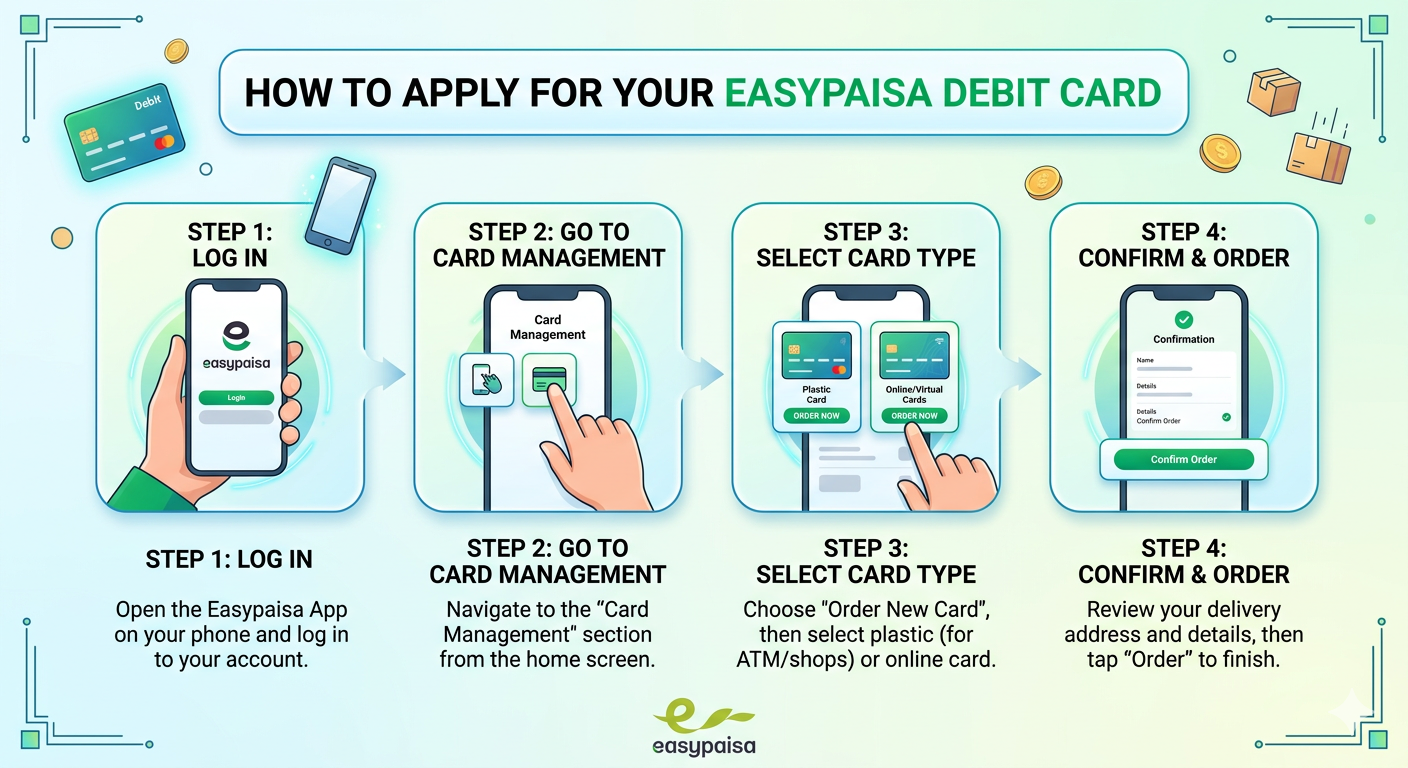
Easypaisa has become one of Pakistan's leading mobile financial services, providing an easy and accessible way to transfer money, pay bills, and shop online. One of the most popular features is the Easypaisa card, which allows users to make seamless transactions without the need for physical cash. Whether you're looking to make online purchases or withdraw cash from ATMs, applying for an Easypaisa card is an essential step toward managing your finances digitally.
In this comprehensive guide, we will walk you through the process of applying for an Easypaisa card, explore the different types of cards available, and provide tips to maximize your card's benefits.
What's in This Guide:
Introduction to Easypaisa Card
What is an Easypaisa Card?
The Easypaisa card is a prepaid card that enables you to make online payments, transfer money, and withdraw cash from ATMs. It functions similarly to a debit card but is not linked to a traditional bank account. This card can be used for local and international transactions, making it a versatile tool for those looking to manage their finances digitally.
Benefits of Easypaisa Card
- Convenience: You can make payments and transfers without needing to carry cash.
- Security: Easypaisa cards offer a secure way to shop online and pay for services.
- Wide Acceptance: It is accepted at various online and offline stores, including international retailers.
- Instant Transfers: You can send money instantly using the card, making it perfect for emergency transactions.
Types of Easypaisa Cards
Easypaisa Debit Card
Make purchases at physical stores and online platforms. Withdraw cash from ATMs. Linked directly to your Easypaisa mobile wallet.
Easypaisa Virtual Card
Designed for online shopping. No physical card, only for digital transactions. Perfect for secure online payments.
Easypaisa Debit Card
The Easypaisa Debit Card allows you to make purchases at physical stores and online platforms, as well as withdraw cash from ATMs. It can be linked directly to your Easypaisa mobile wallet, ensuring you have immediate access to your funds.
Easypaisa Virtual Card
The Easypaisa Virtual Card is designed primarily for online shopping. Unlike the physical card, the virtual card is not a physical item and can only be used for digital transactions. It's an excellent option if you prefer to shop online and don't need a physical card.
Eligibility Criteria for Easypaisa Card
- Age Requirement: You must be at least 18 years old.
- Easypaisa Account: You need to have an active Easypaisa account.
- Valid CNIC: A valid Computerized National Identity Card (CNIC) or National Identity Card for Overseas Pakistanis (NICOP) is required.
- Registered Mobile Number: Your mobile number should be registered with Easypaisa.
Documents Required for Easypaisa Card Application
- Valid CNIC/NICOP (original and a copy)
- Easypaisa Mobile Account: Your account must be registered with your CNIC
- Proof of Address: In some cases, proof of address may be required
How to Apply for Easypaisa Card Online (Step-by-Step)
1 Download the Easypaisa App
If you haven't already, download the Easypaisa app from the Google Play Store or Apple App Store.
2 Create an Account
Open the app, create an account, and verify your mobile number.
3 Navigate to 'Easypaisa Card' Section
Once logged in, go to the 'Easypaisa Card' section.
4 Submit Your Application
Enter your details, including your CNIC number and address information.
5 Upload Documents
Upload scanned copies of your CNIC and any required documents.
6 Verification
Easypaisa will verify your details, and once confirmed, your card will be issued.
In-Branch Application Process
You can also apply for an Easypaisa card by visiting any Easypaisa agent or branch. Here's how:
1 Visit an Easypaisa Agent
Go to the nearest Easypaisa outlet or branch.
2 Provide Your Documents
Submit your CNIC and proof of address.
3 Fill Out the Application Form
Complete the required forms with your personal information.
4 Wait for Verification
The agent will process your application and issue the card after verification.
Activating Your Easypaisa Card
Once you receive your Easypaisa card, you'll need to activate it before using it. Here's how:
1 Log in to the Easypaisa App
Open the app and go to the 'Easypaisa Card' section.
2 Enter Card Details
Input the card number, expiry date, and CVV code.
3 Set Your PIN
Choose a 4-digit PIN for added security.
4 Confirm Activation
After completing these steps, your Easypaisa card will be activated.
Using Your Easypaisa Card
How to Use Easypaisa Card for Online Shopping
The Easypaisa card can be used for online shopping on websites that accept prepaid cards. Simply enter the card details at the checkout page, including the card number, expiry date, and CVV code. Ensure that you have sufficient funds in your Easypaisa wallet before making a purchase.
How to Withdraw Cash Using Easypaisa Card
1 Visit an ATM
Go to any ATM that supports prepaid cards.
2 Insert the Card
Enter your card into the ATM.
3 Enter Your PIN
Input your 4-digit PIN.
4 Select Withdrawal Option
Choose the amount to withdraw and complete the transaction.
Fees and Charges Associated with Easypaisa Card
| Fee Type | Amount |
|---|---|
| Card Issuance Fee | One-time fee (varies) |
| ATM Withdrawal Fee | Small fee per transaction |
| Annual Maintenance Fee | May apply for some cards |
Tips for Maximizing Your Easypaisa Card Benefits
Safe Usage Tips
- Activate Two-Factor Authentication: For extra security, enable two-factor authentication on your Easypaisa account.
- Monitor Transactions: Regularly check your transaction history to avoid unauthorized activities.
- Avoid Sharing Your PIN: Never share your PIN with anyone, and ensure your card is stored in a secure location.
Managing Your Card Limits
Easypaisa cards come with various transaction limits, such as withdrawal limits and online spending limits. You can manage these limits via the Easypaisa app, ensuring you control how much you can spend and withdraw at any given time.
Common Issues and Troubleshooting
Lost or Stolen Easypaisa Card
Blocked Easypaisa Card
In case your card is blocked due to suspicious activity or incorrect PIN attempts, you'll need to contact Easypaisa for assistance in unblocking it.
Frequently Asked Questions (FAQs)
1. How long does it take to get an Easypaisa card?
It generally takes 7-10 business days for your Easypaisa card to arrive after approval.
2. Can I use my Easypaisa card internationally?
Yes, you can use your Easypaisa card for international transactions, as long as the merchant accepts prepaid cards.
3. What happens if I forget my Easypaisa card PIN?
You can reset your PIN through the Easypaisa app or by contacting customer support.
4. Is there an age limit for applying for an Easypaisa card?
Yes, applicants must be at least 18 years old to apply for an Easypaisa card.
5. How do I check my Easypaisa card balance?
You can check your balance by logging into the Easypaisa app or by calling customer service.
6. Can I apply for both Debit and Virtual cards?
Yes, you can apply for both types of cards if needed.
7. Is there a fee for the Virtual Card?
Virtual Card fees may differ from physical cards. Check the app for current charges.
8. Can I use Easypaisa card with Apple Pay or Google Pay?
Currently, Easypaisa cards may not support Apple Pay/Google Pay. Check with customer support.
9. What should I do if my card is declined?
Check your balance, ensure the card is activated, and contact support if issues persist.
10. Can I upgrade from Virtual to Physical card?
Yes, you can apply for a physical card separately even if you have a Virtual card.
Conclusion
The Easypaisa card offers a convenient and secure way to manage your finances digitally. Whether you're shopping online, withdrawing cash, or sending money, it makes financial transactions easier than ever. By following the steps outlined in this guide, you can apply for and make the most out of your Easypaisa card.
📋 Key Takeaways:
- Two Types: Debit Card (Physical) & Virtual Card (Digital)
- Eligibility: 18+ years, active Easypaisa account, valid CNIC
- Application: Online via app or in-branch
- Processing Time: 7-10 business days
- Activation: Through Easypaisa app